14

I have a push button wired to my Arduino but it seems to be triggering randomly.

I have one pin of the button connected to pin 2 on the arduino and the other connected to ground.

void setup() {
    Serial.begin(9600);

    pinMode(2, INPUT);
}

void loop() {
    Serial.println(digitalRead(2));
}

I expect it to print 1 continuously and go to 0 when I press the button down but sometimes it shows 0 even when I don't touch it.

sachleen
  • 7,365
  • 4
  • 37
  • 55

1 Answers1

18

When a button is connected in that configuration, the input is what's called floating, meaning it's not a 0 or a 1. When the button is pressed, it is connected to ground, so that's definitely a 0, but when it's not pressed down, we don't know the value of the pin.

Pull Up Resistor

We need to include what's called a "pull-up" resistor to pull the signal up to a logic 1 when the button is not pressed.
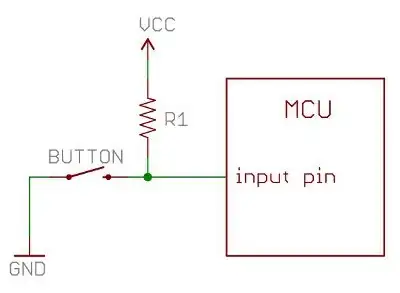
pull up resistor

Image from Sparkfun

What this means is when the button is not pressed, the Arduino reads a logic 1. When the button is pressed, the current flows through the resistor to ground and the Arduino reads a logic 0.

Internal Pull Up Resistor

The Arduino also has internal pull up resistors so you don't necessarily have to add an extra component to your circuit. There are a couple of ways to use this.

You used to have to do it like this:

pinMode(pin, INPUT);           // set pin to input
digitalWrite(pin, HIGH);       // turn on pullup resistors

Now we can do it simply in one line:

pinMode(pin, INPUT_PULLUP);

This enables the 20k pull up resistor on that pin. The input will no longer be floating when the button is not pressed.

Note: This only works when the other end is connected to ground.

sachleen
  • 7,365
  • 4
  • 37
  • 55
  • 2
    It's worth noting that the same idea works for pull-down resistors too; i.e. the resistor normally pulls the pin low, but pressing the button brings it high. Obviously it has to be external though, as there's no internal pull-down on standard Arduinos. – Peter Bloomfield Feb 19 '14 at 23:16
  • I dunno if you evencheck arduino stack exchange now but I am unable to understand the pin diagram. I have push button, with one end having 5V, and the other end having my wire connected to arduino and a 20k Ohm resistor which is connected to ground. Still I am getting random value when the button is not pressed. When it is pressed, I always get 1 – Siddharth Agrawal Apr 16 '21 at 17:35