2

I am using Arduino Uno Rev 3, and according to this link we can achieve 2000000 baud rate.

This problem can be easily repeated by the following code:

void setup() {
  Serial.begin(2000000);
}

void loop() {
  int val = 234;
  Serial.println(val);
}

I am using the serial-USB cable. To read the data, I used Python pyserial (< 20 lines of code including empty lines and import lines):

import serial
import matplotlib.pyplot as plt

LEN = 10000
data = []
ser = serial.Serial('COM3', baudrate=2000000)
for i in range(LEN):
    try:
        data.append(int(ser.readline()))
    except:
        pass
ser.close()

# %% Plot data
plt.figure(figsize=(6, 4))
plt.plot(data)
plt.savefig('data.png')

Here is what I got:

Plot of data

Edit below

Chris mentioned a good point that it might be the high baud rate of 2,000,000 causing the instability. I did think about that when I first ran into this, but then I did a little trick: adding a sinusoid into the constant. If I do that, the weird spiking goes away! I think it indicate that this is not a high baud rate issue... Is it?

Code:

void setup() {
  Serial.begin(2000000);
}

void loop() {
  int val = 234;
  val += int(512 * (sin(float(millis()) * 0.01) + 1)) * 0.1;
  Serial.println(val);
}

Output:
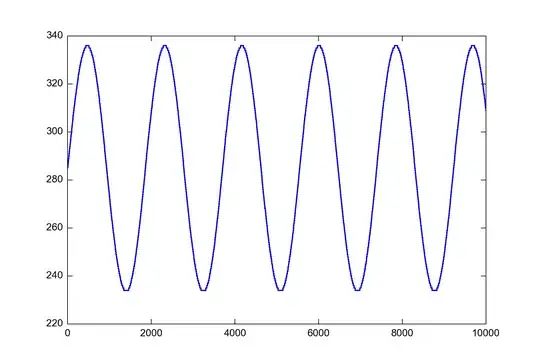
Output

VE7JRO
  • 2,497
  • 15
  • 24
  • 29
Shawn Wang
  • 121
  • 4
  • Your link overlooks many potential issues, such as buffer management in the USB converter. Just because the hardware UARTs can both divide a 16 MHz clock by 8, doesn't mean you can actually move bulk data at that rate reliably, or flush it through the USB backhaul before more comes in. Try capturing the actual data received. – Chris Stratton Apr 17 '15 at 03:43
  • Setting a high baud rate isn't necessarily going to move your data any faster anyway - if the bottleneck is elsewhere, it may just make it less reliable. For maximum throughput, look at a Leonardo-style board (or better yet, one of the ARM-based ones) as there, the baud rate is ignored and the USB will simply move the data as fast as the embedded processor can keep up with. – Chris Stratton Apr 17 '15 at 03:51
  • Please merge your two questions of today on this topic by editing all the content into one and deleting the other. – Chris Stratton Apr 17 '15 at 04:51
  • @ChrisStratton I thought about that too, but then if I do a little trick and add a sinusoid into it, it will transfer all right! I will update the OP now to show that. – Shawn Wang Apr 17 '15 at 05:20
  • 5
    You are probably just delaying things with the time consuming calculation, allowing time for something to catch up. Your overall problem is that your baud rate is **unreliably** high for one or more of the pieces in the chain. – Chris Stratton Apr 17 '15 at 05:43
  • @ChrisStratton That makes total sense. I think you are right - would you mind posting this as an answer so I can accept it? – Shawn Wang Apr 17 '15 at 06:31
  • Actually I'm not convinced that this relies to unstability due to the high baud rate. In that case I would expect the incorrect values to be more random. In your (initial) case, you seem to have false `0`s and (I guess) `23400`s which would be the right valie plus additional zero's. At least when running such a python script on a RPi, the arduino is way too fast for the python script. – Sim Son Aug 24 '19 at 21:14
  • So, in your initial example you could add a delay between the `Serial.println()`s to check... – Sim Son Aug 24 '19 at 21:15

0 Answers0