47

I have a MacBook Pro running OS X Yosemite (10.10.3). I connected my Arduino UNO R3 to my computer for the first time after the Yosemite upgrade - it worked fine before this!

When I opened the Arduino IDE I selected Tools > Board > "Arduino UNO", but when I try to choose a Serial Port the only options are:

/dev/tty.Bluetooth-Incoming-Port
/dev/cu.Bluetooth-Incoming-Port
/dev/tty.Bluetooth-Modem
/dev/cu.Bluetooth-Modem

I have followed several tutorials and threads on how to 'fix' this issue, all to no avail:

I've installed the latest version of the FTDI drivers (even though, from what I recall the UNO doesn't even need them): FTDIUSBSerialDriver_v2_3.dmg

Downgraded to a prev. version of the FTDI driver hoping that would clear it up: /Volumes/FTDIUSBSerialDriver_v2_2_18

I followed a tutorial of how to remove the existing Apple drivers and removed the kext files, etc...

Tried connecting arduino to both USB ports.

Tried various cables, including the one that a I used before the Yosemite upgrade.

Tried installing updated Silabs drivers: Arduino compatible's serial port not showing Mac OSX

Walked through the entire Arduino Mac OSX guide: http://www.arduino.cc/en/guide/macOSX

After looking into the system info of my Macbook Pro, I can see the USB Controller is Broadcom based, in case that helps. I searched for Broadcom USB drivers but got hits for Silabs one instead.

Under my Tools > Port menu.. I can see these options: enter image description here clicking the Serial Ports option doesn't do anything.
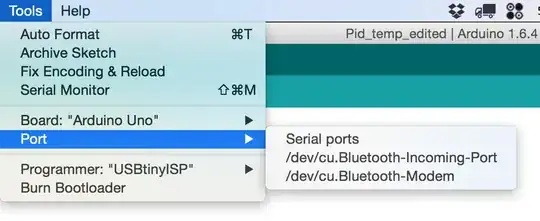
Running ls -1 /dev/tty.* or ls -l /dev/tty.usb* from terminal gives me:

/dev/tty.Bluetooth-Incoming-Port
/dev/tty.Bluetooth-Modem

The Board does NOT show up under system networking (as it has for others), so it's not recognized as an incorrect device.

I'm at a complete loss. The board powers up... but I cannot connect to it.

SIDE NOTE: This is a legit Uno R3, not a clone.

revive
  • 571
  • 1
  • 4
  • 3
  • If it is a legitimate Uno, then all of the FTDI and SiLabs efforts are an irrelevant distraction at best. Ideally, test the board and cable on an another machine to make sure it has not been damaged in the meantime, and try a different USB port on the Mac (especially try connecting through a keyboard or hub if you tried directly, or directly if you had tried a hub). I believe if you look in system information you can get a listing of all USB devices, which would be good to include in your post. – Chris Stratton May 25 '15 at 19:54
  • That's what I was thinking - regarding the FTDI drivers - but those were the only solutions I could find claiming to 'solve' this issue. I have tried other USB ports on the Macbook and will fire up my Apple keyboard since it has a USB port and reply back. I did write in my post the USB devices recognized in terminal. – revive May 25 '15 at 19:57
  • Ok, tried my Apple YSB keyboard - connecting Uno to USB port === no dice – revive May 25 '15 at 21:11
  • Moved the Apple USB Keyboard back to my iMac and tried to connect to Uno there.. selected Uno from the Board menu and still only shows bluetooth modems from the Serial Port menu. – revive May 25 '15 at 21:14
  • After updating the Arduino app to 1.6.4 the Port menu now shows the same options as my Macbook (shown in the image in Orig. Post) – revive May 25 '15 at 21:19
  • You really should look not just in the Arduino IDE but in system information or whatever they call it (get there from the about this mac, and advanced, etc) and see what USB devices it is seeing. And again, test the board on another machine to make sure it is still good. – Chris Stratton May 25 '15 at 21:48
  • 1
    1) I've checked for 'visible' USB devices in both the System Info screen and via the Terminal.. both show the same.. and only bluetooth are present (aside from keyboard and my external HDD). 2) I have now tried this on both my Mackbook Pro and my iMac .. neither of which 'see' the USB connection. – revive May 25 '15 at 22:04
  • Post a complete list of the raw USB (not serial) devices (ie, VID/PID) the system (not IDE) sees connected. – Chris Stratton May 25 '15 at 22:58
  • 1
    I did. I copied the LS from Terminal as well as identified, through the system settings screen, that there are only the USB to Bluetooth, Keyboard and Internal Memory Card controller. I checked both the IDE and the System screen after: 1) changing cables, 2) adding an Apple USB keyboard and using it;s USB port, 3) trying the same sequence on my iMac (keyboard usb and main usb).. nothing. The board is not listed. Period. – revive May 25 '15 at 23:09
  • @ChrisStratton If there is another way to do this, to get the info you're asking for.. please let me know. But at this point, I've looked/checked everywhere that I know how to. – revive May 25 '15 at 23:14
  • Until you have demonstrated that the board still works on *some* system (at this point probably not a Mac) you will have to consider it to be damaged. – Chris Stratton May 25 '15 at 23:20
  • 1
    Well, looks like the board might very well be shot. I fired up my wifes Windows laptop, installed Arduino, etc.. attached power and USB to Uno and it doesn't show in either the Arduino app or File Explorer. Not sure what/how it happened as the board was stored in an air tight, dry, cool container within a static free bag - the one it shipped it. And, I'd already ran this sketch once to perfection... bummer. Any other thoughts or possibilities? – revive May 26 '15 at 00:07
  • After reading this I just tried out some of my Arduino machines, which worked properly so far, and indeed after upgrading to Yosemite yesterday, now none of my machines and none of my cables are recognized. I suspect a driver incompatibility... – dda Jul 03 '15 at 05:39
  • 1
    I come back to the first question. I think I have the same problem. Basically I tried to install FTDIUSBSerialDriver v2_3.dmg on OS X Yosemite 10.10.5 The installation succeed But if I am looking in the /System/Library/Extensions/ I can see no FTDIUSBSerialDriver.kext if I go ls /dev |grep usbserial no cu.usbserial-A9GBBDLL or tty.usbserial-A9GBBDLL Please help –  Feb 07 '16 at 13:47
  • Just wanted to add that I was having this same issue and switching to a different USB cable worked for me. I did not even know there was such a thing as a power-only USB! – SteveC Dec 13 '15 at 22:22
  • This posted question has shown me the truth after a good 12 hours of absolute bupkis trying to get my V3 to show up in the serial ports. Thank you OP, for the release from hell. – Wowthisishard Jun 13 '17 at 11:26
  • This is the best solution and drivers I've found: https://github.com/adrianmihalko/ch340g-ch34g-ch34x-mac-os-x-driver – IgorGanapolsky Dec 27 '17 at 16:43

11 Answers11

44

Probably, you have Chinese Uno analog which works on CH340 USB-to-serial chip, so you need to install driver for it.

Steps to fix:

  1. Install the CH340 driver
  2. Run the command in Terminal: sudo nvram boot-args="kext-dev-mode=1" (disable kext signing introduced in Mac OS X 10.9 Yosemite)
  3. Reboot

Also you're right according to Uno and FDTI:

Differences with other boards

The Uno differs from all preceding boards in that it does not use the FTDI USB-to-serial driver chip. Instead, it features the Atmega16U2 (Atmega8U2 up to version R2) programmed as a USB-to-serial converter.

Tensho
  • 541
  • 4
  • 3
  • 4
    Thanks for including the CH340 chip number right in your answer. – paperreduction Jan 09 '16 at 20:08
  • 3
    On OSX 10.11.6, installing the driver and rebooting solved this for me. No need for step 2. – Alex Shroyer Sep 14 '16 at 20:59
  • 2
    This worked on 10.9.4 without step 2. Now I expect my private SSH keys to be located on some chinese servers though :) – polym Nov 26 '16 at 15:02
  • 1
    @polym - was the second half of your comment really necessary? – Colin Jan 01 '17 at 10:35
  • Unfortunately the driver causes a kernel panic as soon as I plug in the Arduino. I'm on macOS Sierra 10.12.2. – Colin Jan 01 '17 at 10:58
  • 1
    @Colin did you manage to get it working? – rebellion Jan 10 '17 at 11:38
  • @Ronny-AndréBendiksen No I didn't get it working. I just moved the upload step to my Raspberry Pi. :P – Colin Jan 10 '17 at 16:45
  • OSX 10.12.4 gives the following error when trying "sudo nvram boot-args="kext-dev-mode=1" " => nvram: Error setting variable - 'boot-args': (iokit/common) general error – kalmiya May 27 '17 at 10:02
  • 1
    If you're on Sierra, use this patched version of the driver. Worked like a charm: https://github.com/adrianmihalko/ch340g-ch34g-ch34x-mac-os-x-driver – Joris Oct 14 '17 at 12:00
  • 1
    When I run `nvram`, I get an error: **nvram: Error setting variable - 'boot-args': (iokit/common) general error** – IgorGanapolsky Dec 27 '17 at 16:36
  • 1
    @IgorGanapolsky - Starting with macOS Sierra, you must be booted to the recovery partition to run the nvram command. – Justin Lewis Feb 13 '18 at 19:55
  • This solution didn't fix the problem for me. However, since it seems to work for some people, the new v1.4 version of the driver that supposedly works for High Sierra is here. : https://drive.google.com/file/d/1lUYkw-mCOekJjY1MVA5YuEbERHNWNCZW/view?usp=sharing – Justin Lewis Feb 13 '18 at 19:58
  • I was able to get a new `/dev/cu.wchusbserial1410` to show up by following the instructions from https://github.com/adrianmihalko/ch340g-ch34g-ch34x-mac-os-x-driver , didn't need nvram. Thanks for the link – Andrei-Niculae Petre Jan 18 '19 at 03:53
  • I get the following after installing the driver from [github.com/adrianmihalko](https://github.com/adrianmihalko/ch340g-ch34g-ch34x-mac-os-x-driver) and executing the `sudo kextload /Library/Extensions/usbserial.kext` step. Then I get this: `/Library/Extensions/usbserial.kext failed to load - (libkern/kext) system policy prevents loading; check the system/kernel logs for errors or try kextutil(8).` – Bill Oct 19 '19 at 01:09
15

The cable that shipped with my Arduino Uno worked for power but not data transmission so the /dev/tty.usbmodem was not showing up in the Tools --> Port menu. After I switched to a different cable, the /dev/tty.usbmodem port showed up and it worked beautifully.

cnanders
  • 151
  • 3
  • 3
    The same thing happened to me. I was trying to connect my Arduino with a power-only cable. Once I switched USB cables, the USB device appeared. – hotpaw2 Jul 31 '15 at 06:04
  • 1
    I had this same problem and all it took was a different cable – Simon Apr 15 '17 at 19:15
  • 1
    This is definitely the solution for me! Thanks a ton! – tugcem May 06 '17 at 00:06
  • I have had this problem before, with Circuit Playgrounds, but forgot all about it. Switching the cable should always be the first attempt. – ow3n Jan 31 '18 at 21:43
  • Same, I got the elegoo mega 2560 kit and the little usb c cable seemed to only work part of the time. Odd... – Kyle Pennell Apr 25 '21 at 04:46
6

This fixed the problem for me:

http://blog.sengotta.net/signed-mac-os-driver-for-winchiphead-ch340-serial-bridge/

... and the direct link to download.

EDIT: I have one of the cheap clones with a CH340 USB chip. So this might not solve your problem, but could be beneficial to others.

Stefano Masini
  • 169
  • 1
  • 2
5

Yosemite 10.9 (and OS X 10.10 and newer) requires a signed USB driver kext (kernel extension). You can find one on the FTDI web site here: http://www.ftdichip.com/Drivers/VCP.htm
Use version 2.3 for 64-bit OS X 10.9 or later. Install and reboot.

Plug in your Arduino, and the Terminal command:

/usr/sbin/kextstat | grep FTDI

will tell you if the FTDI VCP driver actually loaded.

Also a /dev/tty.usbserial-xxxxxxxx entry should appear in your /dev directory.

If not, the Mac USB port isn't talking to your Arduino. So it's no use trying the Arduino IDE application.

Also make sure your USB cable isn't for power only, but fully connected.

hotpaw2
  • 279
  • 4
  • 11
5

This site fixed the problem for me:

http://kiguino.moos.io/2014/12/31/how-to-use-arduino-nano-mini-pro-with-CH340G-on-mac-osx-yosemite.html

...somebody else has made an alternative to the ftdi drivers, and this website show you how to install them correctly.

Gary
  • 59
  • 1
  • 1
4

This exact same thing happen to me on my mac running the same operating system. I had to restart this system a few times to get it to work. I restarted it with the arduino plugged in; and that worked rather than my previous attempts when i rebooted then plugged in.

1

Check this video https://www.youtube.com/watch?v=0zuRukW7o0A

  • Reboot and press CMD+R immediately after reboot to enter in Recovery Mode
  • Open Terminal from Recovery mode
  • Run the command csrutil enable --without kext
  • Reboot
  • Install driver
Vitalij
  • 21
  • 2
1

I have an osepp r3, seemingly an accurate clone. Computer is Mac os10.10.5.

A lot of sites claimed that the mac osx.* does not require FTDI drivers, but.....

After an awkward, google searching beginning, where the board only accepted a new sketch after being physically unplugged and replugged, I downloaded the latest FTDI driver, installed, and RESTARTED the mac. Now, joy and peace reigns. No side-effects with other mac functions, thankfully. Hope this helps.

dpickell
  • 11
  • 1
0

Stumbled across this. It worked for Mac OS X Yosemite 10.10.5

install the CH340 driver Run the command in Terminal: sudo nvram boot-args="kext-dev-mode=1" Reboot

However, I installed: MAC system:www.wch.cn/downfile/178

so YMMV

a user here: http://forum.makeblock.cc/t/mac-os-x-yosemite-arduino-1-0-6-doesnt-recognize-makeblock-orion/728

found the solution, there: http://forum.arduino.cc/index.php?topic=261375.15

so kudos - to all that sweated out the driver, uninstall, install, and activation...

Ted

0

In my case, there was some kind of incompatibility with the ESP8266 connected to the Nano board. As soon as I removed it the Serial Port appeared again.

Tomas
  • 11
0

First, check the USB cable - I had the same problem. If you have checked it, try the HoodLoader2:

I am using it and it works with Arduino Leonardo.