10

I bought an Arduino-compatible Freaduino board atmega8 (I selected the board type as Arduino ng or older atmega8). I installed the Arduino IDE on Mac OS X and the FTDI drivers. But my serial port looks like this when I connect the board:

screenshot 1

And when I try to upload the program, this is the error I get:
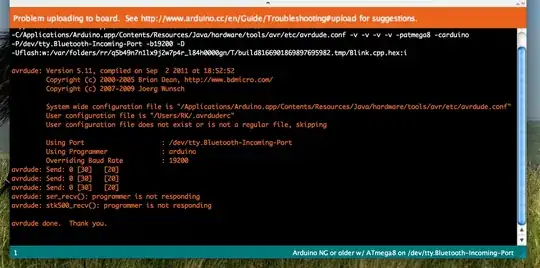
screenshot 2

Can someone tell me what is the mistake? I am clueless.

UPDATE: the problem was I had not installed the driver properly (I guess). I uninstalled and reinstalled them and it worked perfectly. Also made a YouTube tutorial regarding the same. http://youtu.be/BwatajQO_88

dda
  • 1,553
  • 1
  • 12
  • 17
Rajath
  • 225
  • 1
  • 4
  • 10
  • Have you set the Board correctly to the one you have? Also, almost definitely it is not the Bluetooth tty that you have connected to. Very likely it is the USB tty. – sathishvj Jul 16 '14 at 14:49
  • yes the led (PWR) glows on the board as soon as i connect it. – Rajath Jul 16 '14 at 14:51
  • i tried tty.SLAB_USBtoUART to. it dint work same error – Rajath Jul 16 '14 at 15:05
  • Disconnect the board, close the IDE, and re-open it. Did any of the devices disappear? Also (with it plugged in) do apple-menu about - more info - system report and look at what is listed under USB. Finally consider trying it on a different computer/OS to rule out problems with the board. Oh, and try a different cable/USB port. Try connecting it directly to the MAC and try connecting it through a keyboard or other hub. – Chris Stratton Jul 16 '14 at 15:57
  • Why not copy the plain text instead of uploading the lower 372kB image? Search engines won't be able to index the text and mobile users are hit with a large download where 1kB of text would suffice. – jippie Jul 16 '14 at 16:19
  • does the `dmesg` command show any fresh output after plugging in the Arduino? – jippie Jul 16 '14 at 16:20
  • @ChrisStratton `CP2102 USB to UART Bridge Controller: Product ID: 0xea60 Vendor ID: 0x10c4 (Silicon Laboratories, Inc.) Version: 1.00 Serial Number: 0001 Speed: Up to 12 Mb/sec Manufacturer: Silicon Labs Location ID: 0x14100000 / 8 Current Available (mA): 500 Current Required (mA): 100 ` this is what comes in USB in more info about this mac. it is directly connected to mac. still same error. – Rajath Jul 16 '14 at 16:50
  • @jippie i ran sudo dmesg on terminal and yes it did show changes in the output after plugging in the arduino. – Rajath Jul 16 '14 at 16:54
  • Did it list mentioned device? – jippie Jul 16 '14 at 17:48
  • yes it did. many com_silabs came up. i suppose that means mentioned. – Rajath Jul 16 '14 at 18:31
  • Confirming this behaviour with the Freetronics' Aduino Eleven Starter Kit. No new ports became available when the kit was attached via USB. The unit appears to run fine using Port: tty.usbmodemfmd131 and accepts and responds to uploads on MacOS 10.9.5 using 1.5.8 Java 6 & when using 1.5.8 Java 7 – dj.cowan Dec 06 '14 at 11:48

4 Answers4

8

From the OSX System Report we learn that your board is based on an SiLabs CP2102 converter (or workalike), but according to your question you installed the drivers for an entirely different product from FTDI

(Arduino.cc has used FTDI in the past and CDC/ACM today, I don't believe they have ever used SiLabs so their instructions probably don't cover that, but other vendors obviously have)

Install the CP2102 drivers and it should work if you use the /dev/tty.XX device which then appears when you plug in the board.

SiLabs appears to provide the drivers at

http://www.silabs.com/products/mcu/pages/usbtouartbridgevcpdrivers.aspx

Just for sake of completeness, there are at least 5 distinct protocols/chips in use for serial-like USB communication with embedded devices:

  • FTDI
  • CDC/ACM Virtual Com Port
  • SiLabs CP210x
  • Prolific PL-2303
  • ch340

(Additional possibilities could include actual RS232 serial or serial-over-bluetooth)

Chris Stratton
  • 5,346
  • 17
  • 40
  • first i installed FTDI. as it dint work and then i found this [link](http://superuser.com/questions/547046/how-to-get-mac-os-x-10-8-mountain-lion-to-see-usb-modem-device-arduino) as one of the answers were to install silabs drivers i installed them too. but not working. i tried this before only. really appreciate ur effort to help me out. – Rajath Jul 16 '14 at 17:44
  • You do seem to have device files for that driver in your list. If it didn't work when you selected those, you might have the wrong baud rate (from the chosen board configuration). Another possibility (especially with alternate sources) is that you have a bad board - the CP2102 chip might be okay, but that doesn't mean that the AVR is, or that is has a bootloader programmed. I'd probably try different baud rates, try burning a bootloader via ISP, etc. But ultimately, why are you bothering with an ATmega8 board? – Chris Stratton Jul 16 '14 at 17:49
  • how do u change the baud rate? i have taken up a project which was not completed by my senior. so he has used that board. – Rajath Jul 16 '14 at 18:28
  • I think you may have to create a new "board" entry in the configuration and edit the baud rate in its file, then restart the IDE. You might as well create several for different board rates. – Chris Stratton Jul 16 '14 at 18:41
  • u mean something like [this](http://arduino.cc/en/Serial/begin) ? – Rajath Jul 16 '14 at 18:52
  • No, that has nothing to do with the bootloader. You need to generate new board configurations in a boards.txt file on your PC giving different possible baud rates, then restart the IDE and try them. – Chris Stratton Jul 16 '14 at 18:53
  • still not working. will buy a atmega328 best. UNO will not have the same problem right? – Rajath Jul 16 '14 at 20:52
  • A genuine UNO from Arduino.cc shouldn't require driver installation on OSX, and should come with a bootloader expecting a baud rate already configured in the Arduino IDE, should give you more space for programs, and is a product with a generally strong reputation for quality control. Beyond that though, we don't actually know what the problem with your current alternate source mega8 board is. – Chris Stratton Jul 16 '14 at 20:54
5

just to add to the list - some cheaper boards use CH340 chipset

here is a blogpost on how to install the drivers on OSX http://javacolors.blogspot.ie/2014/08/dccduino-usb-drivers-ch340-ch341-chipset.html

From that post:
You can find drivers for this chip on the web site of the chinese manufacturer, here :
http://www.wch.cn/downloads.php?name=pro&proid=5

JRobert
  • 14,769
  • 3
  • 20
  • 49
Slav
  • 151
  • 1
  • 2
0

If you still have problems, like me after following the above, this might help: From this thread: http://forum.arduino.cc/index.php?topic=292284.msg2229300#msg2229300

the problem is in the spaces of the device name. To fix that you have to manually edit two (2) txt files of the arduino installation.

Go where you have installed it. In my case the path is:

/Users/MY_USERNAME/Downloads/Arduino.app/Contents/Java/hardware/arduino/avr

Inside this directory you can see files platform.txt & programmers.txt.

Inside these files replace -P{serial.port} with "-P{serial.port}". So you simply have to add the quotes.

Then restart.

0

http://arduino.cc/en/guide/macOSX

That link should almost definitely get it working for you. Ensure (as in Step 7) that the board you have is the same one that is selected in Tools->Board.

And in step 8, since you have connected via a USB cable, it should be one of the USB named options.

sathishvj
  • 101
  • its an atmega8. i have selected arduino ng or atmega 8 board. the USB is not appearing in the serial port though the arduino is connected the PWR does light up. – Rajath Jul 16 '14 at 14:59