5

I have arduino Pro Mini 3.3V version with hc-05 module connected to 3.3V/GND and RXI/TX0 pins. I am then using my android phone to connect to the module. It shows up and pairs fine. Then I use BlueTerm app to view the output. I am seeing output that is occasionally as expected but mostly partially corrupted (characters replaced with random characters).

I am using 9600 baud rate and trasmitting the following:

void serialTransmit(int data){
  // send to raspberry pi or other device(s).
  Serial.print("Serial Transmit: ");
  Serial.println(data); // this is hard coded as "12" for testing
}

I tried switching rx/tx pins around but got same corrupt output. Tried changing baud rate but then it wouldn't transmit anything at all and default rate is 9600 so that was expected.

What could be the cause?

Anonymous Penguin
  • 6,155
  • 9
  • 31
  • 62
DominicM
  • 577
  • 3
  • 7
  • 13
  • Does it show up as expected when using a computer? Also, I've seen some models with 38400 baud – Anonymous Penguin Mar 18 '14 at 19:32
  • I don't have bluetooth on any of my pc's yet, could try a tablet but should it matter if it's android or another OS? ebay listing does say 9600 baud rate but will try 38400 later. – DominicM Mar 18 '14 at 23:00
  • Tablet should be fine, just to double check the reading. Could you also try setting the parity bit/etc. on BlueTerm? – Anonymous Penguin Mar 18 '14 at 23:12
  • Not seeing any such option in BlueTerm or other 3 apps I tried. It does seem odd that I get about 10 lines correctly at the beginning and only then it starts to corrupt. – DominicM Mar 19 '14 at 01:36
  • That's weird... – Anonymous Penguin Mar 19 '14 at 01:37
  • It's strange that you should get anything at all in one of the rx/tx configurations. Try changing the test string and confirm that what the few "good" transmissions really are true. – JRobert Sep 15 '15 at 16:51

3 Answers3

2

First thing to try:

Connect a 2.2k - 10k resistor from the arduino RX pin (the hc-05 tx pin) to ground.

If that didn't work, I recommend getting everything into a known state and eliminating some complexity. So, first let's remove the Android software from the equation. And second, let's put the module into a known baud rate.

To do this wire up the arduino and module like this:schematic
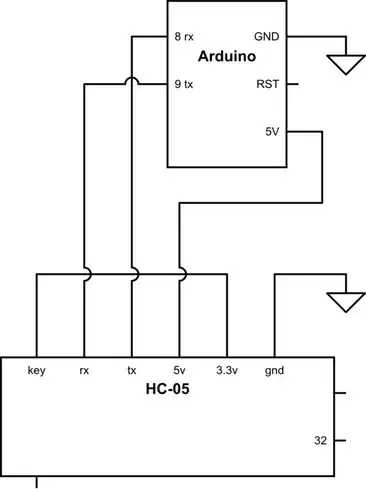
Notice that the Key pin is connected to 3.3v. That will ensure the module is at 38400 baud on power up.

Connect the arduino to your computer with the FTDI cable. Upload the following sketch:

/* Serial Loop */

#include <SoftwareSerial.h>

#define rxPin 8
#define txPin 9

SoftwareSerial mySerial(rxPin, txPin); // RX, TX
char myChar ;

void setup() {
  Serial.begin(9600);   
  Serial.println("AT");

  mySerial.begin(38400);
  mySerial.println("AT");
}

void loop() {
  while (mySerial.available()) {
    myChar = mySerial.read();
    Serial.print(myChar);
  }

  while (Serial.available()) {
    myChar = Serial.read();
    Serial.print(myChar); //echo
    mySerial.print(myChar);
  }
}

With the sketch now uploaded and running, open the Arduino serial console and enter these AT commands. The serial console baud rate should be set to 9600 and line endings should be "Both NL & CR"

AT+ORGL //back to factory settings
AT+ROLE=0 //slave role - transparent serial bridge
AT+UART=9600,0,0 //default baud rate
AT+INIT //init module

You should get "OK" back from the module after each command. If you've gotten this far, we know the module is working fine and we know what baud rate it will default to now.

Hook the module back up the way you had it before. Make sure 3.3v is disconnected from key pin and make sure you have added the pulldown resistor on the RX line. Cycle the power to the module. The module should start up running 9600 baud, slave mode. Delete the module from the Android pairing list and re-pair it. The name probably will have changed. Hopefully it works correctly now.

Cheers

imjosh
  • 518
  • 2
  • 5
  • I tried 4.7k resistor but it didn't make a noticeable difference, I assume there's no point in trying different resistor values? Also my module is bale, and has no voltage regulator, does your diagram apply to this situation since the module is rated at at 3.3V. Will need to wait until I receive my new soldering iron to change connections, clamping cables to the module is tedious :) – DominicM Mar 19 '14 at 01:47
  • I think I saw 2.2k recommended, but tried it and worked with 10k. The diagram applies except ignore the 5v line. You take 3.3v from the mini pro vcc pin to the BT module VCC and Key pin (pin 34). – imjosh Mar 19 '14 at 02:37
  • Until your soldering iron comes in, try using software serial instead of hardware serial. just move rx and tx on the arduino from 0 and 1 to some other digital pins. See my code as an example. – imjosh Mar 19 '14 at 02:40
  • If your wires are just clamped(alligator clips?) onto the module, you may just have a loose connection. – imjosh Mar 19 '14 at 02:47
  • I tried software serial but couldn't get any output, will try to get it to work tomorrow. It's not even alligator clips, it's a small hand clamp that's pushing the wires against the contacts on one side :) Connections seem solid though... – DominicM Mar 19 '14 at 02:51
  • Ok, so now I have a new module with breakout board. Connecting is easy now and I have tried connecting it like in your diagram. What I get as output instead of OK is some gibberish. The length seems to change depending on the input length. This is what it looks like: xÿx0þàø (input was AT+ORGL). The corruption is different now in that there is nothing discernible at all. Any ideas? – DominicM Apr 18 '14 at 17:56
  • It sounds like there is a baud rate mismatch somewhere. What settings are you using where? Are you running the same sketch I posted? Are you using the arduino serial console? – imjosh Apr 19 '14 at 19:31
  • Yes, I am using latest arduino software and the Serial console that come with it. I pasted the same code you posted in a new sketch. What else could I try? – DominicM Apr 20 '14 at 20:57
  • what baud rate setting are you using in BlueTerm? – imjosh Apr 21 '14 at 13:43
  • I tried again on a new breadboard and it worked this time, I think it was interference from another unused device connected to the same pin as serial pins. Not sure what it was last time. Thanks for your help! – DominicM Apr 21 '14 at 21:06
0

I have the same problem with arduino pro mini and HC-06, only change the baud rate of your BTserial port... try diferent baud rates in my case:

Serial.begin(9600);   
Serial.println("AT");

BTSerial.begin(2400);
BTSerial.println("AT"); 

Works fine, it happens because the arduino try to "understand" the module, but if the module speaks other leanguage, the arduino will never understand the command.

like me... sorry for my bad english. se ya.

Nick Gammon
  • 35,792
  • 12
  • 63
  • 121
eric
  • 1
-1

Add the module as software serial then add these lines to setup() these line tell us the Bluetooth to turn into data mode:

bluetooth.begin(115200);
bluetooth.print("$$$");
delay(100);
bluetooth.println("U,9600,N");
bluetooth.begin(9600);
The Guy with The Hat
  • 4,962
  • 7
  • 28
  • 51
Dexter
  • 1